Em seguida, edite o arquivo e remova o caractere # do início da linha 3, ele deve ficar assim:
# sudo_local: arquivo de configuração local que sobrevive a atualizações do sistema e é incluído para sudo# descomente a linha a seguir para habilitar o Touch ID para sudoauth sufficient pam_tid.so
Passos detalhados para editar o arquivo
Para editar o arquivo, use um editor de texto como nano ou vim. Por exemplo, com o nano:
Then edit the file and remove the # character from the beginning of line 3, it should look like this:
# sudo_local: local config file which survives system update and is included for sudo
# uncomment following line to enable Touch ID for sudo
auth sufficient pam_tid.so
Detailed Steps to Edit the File
To edit the file, use a text editor like nano or vim. For example, with nano:
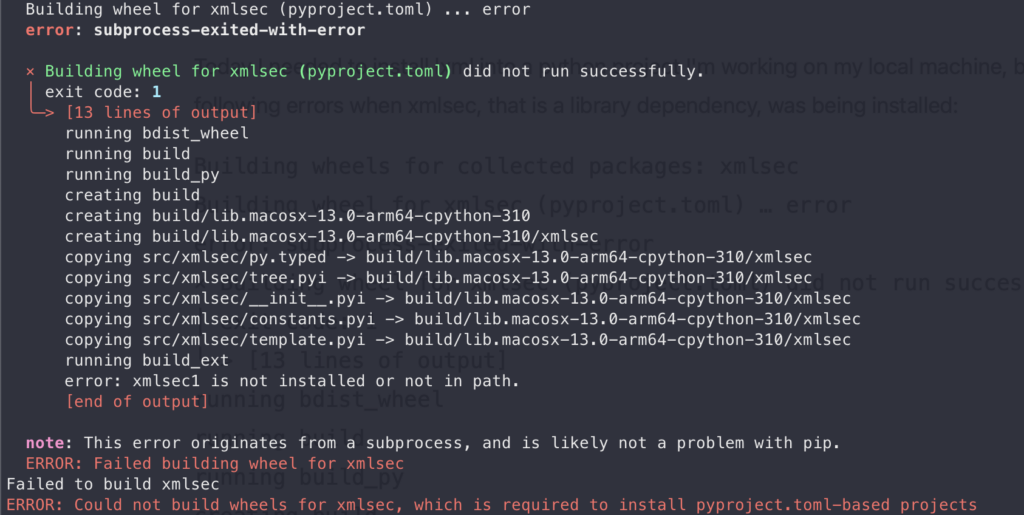
Today I needed to install lxml into a python project I’m working on my local machine, but I got the following errors when xmlsec, that is a library dependency, was being installed:
Building wheels for collected packages: xmlsec
Building wheel for xmlsec (pyproject.toml) … error
error: subprocess-exited-with-error
× Building wheel for xmlsec (pyproject.toml) did not run successfully.
│ exit code: 1╰─> [13 lines of output]running bdist_wheel
running build
running build_py
creating build
creating build/lib.macosx-13.0-arm64-cpython-310
creating build/lib.macosx-13.0-arm64-cpython-310/xmlsec
copying src/xmlsec/py.typed -> build/lib.macosx-13.0-arm64-cpython-310/xmlsec
copying src/xmlsec/tree.pyi -> build/lib.macosx-13.0-arm64-cpython-310/xmlsec
copying src/xmlsec/**init**.pyi -> build/lib.macosx-13.0-arm64-cpython-310/xmlsec
copying src/xmlsec/constants.pyi -> build/lib.macosx-13.0-arm64-cpython-310/xmlsec
copying src/xmlsec/template.pyi -> build/lib.macosx-13.0-arm64-cpython-310/xmlsec
running build_ext
error: xmlsec1 is not installed or not in path.
[end of output]note: This error originates from a subprocess, and is likely not a problem with pip.
ERROR: Failed building wheel for xmlsec
Failed to build xmlsec
ERROR: Could not build wheels for xmlsec, which is required to install pyproject.toml-based projects
So to install it, on my MacBook machine with Apple Silicon and macOS Ventura, I needed to execute the following commands:
I’m using macOS again, and of course that I’ll forget this tip, so I’ll write this post to help me another day in the
future.
If you want to enable the click and drag option on MacBook, just go to: System Preferences → Accessibility → Pointer
Control → Mouse and Trackpad → Trackpad Options → Enable Dragging.